Uscora Keynote Template: A Versatile Tool for Professional and Creative Presentations
If you're looking for a sleek, professional, and highly customizable presentation template, the Uscora Keynote Template is an excellent choice. Designed with both creators and professionals in mind, this template offers a range of features that make it ideal for a variety of scenarios. Whether you're pitching a business idea, teaching a class, or showcasing your work, the Uscora Keynote Template can help you deliver your message with clarity and impact.
What Is the Uscora Keynote Template?
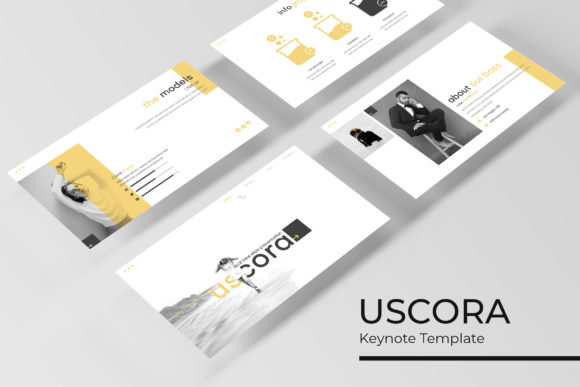
The Uscora Keynote Template is a comprehensive presentation package that includes 150 slides across five different color variations. Each color scheme comes with 30 slides, giving users a wide range of visual options to match their brand, project, or personal style. The template is built using Apple’s Keynote software, making it easy to use on Mac computers and compatible with other platforms when exported as PDF or video files.
One of the standout features of the Uscora Keynote Template is its focus on design quality. From pixel-perfect illustrations to handcrafted infographics, every element is crafted to ensure a polished and professional look. The template also includes section break slides, gallery and portfolio slides, and resizable graphic placeholders that can be easily edited or replaced.
When and Where to Use the Uscora Keynote Template
The Uscora Keynote Template is incredibly versatile and can be used in a variety of settings. Here are some common situations where it shines:
- Business Presentations: Entrepreneurs, sales teams, and business owners often need to present ideas, reports, or proposals. The Uscora Keynote Template provides a clean and modern layout that makes complex information easy to digest.
- Educational Settings: Teachers, professors, and trainers can use the template to create engaging lesson plans, lecture slides, or student presentations. The organized structure and visual appeal help keep students focused and interested.
- Marketing and Advertising: Marketers and advertisers rely on visually compelling presentations to pitch campaigns, showcase products, or analyze data. The Uscora Keynote Template’s professional design helps convey credibility and attention to detail.
- Portfolio Displays: Artists, designers, and freelancers can use the template to build a digital portfolio. With dedicated gallery and portfolio slides, it's easy to showcase work in a structured and aesthetically pleasing way.
- Personal Projects: Whether you're creating a presentation for a hobby, a community event, or a personal goal, the Uscora Keynote Template offers the flexibility to express your unique style while maintaining a professional appearance.
Why Users Choose the Uscora Keynote Template
There are several reasons why professionals and creatives choose the Uscora Keynote Template over other options. One of the main advantages is the time it saves. Instead of starting from scratch, users can leverage pre-designed layouts and focus on crafting their message. This is especially useful for those who may not have extensive design experience but still want to produce high-quality presentations.
Another benefit is the template’s adaptability. With five color variations, users can easily switch between themes to match different projects, brands, or events. The drag-and-drop functionality based on master slides makes it simple to customize without disrupting the overall design. Additionally, the inclusion of editable graphics and picture placeholders means users can quickly update content without needing advanced design skills.
The Uscora Keynote Template also includes a readme file with instructions, a free font download link, and details about what’s included. These resources make it easier for users to get started and understand the template’s capabilities.
Real-World Applications and Scenarios
Let’s take a closer look at how different users might apply the Uscora Keynote Template in real-life situations:
- A Startup Founder Pitching to Investors: A startup founder preparing a pitch deck can use the Uscora Keynote Template to present their business model, market analysis, and growth strategy. The clean layout and professional design help convey confidence and competence, which is crucial when seeking funding.
- An Educator Creating a Lecture: A teacher designing a classroom presentation can use the template to organize course material, add visual aids, and engage students with well-structured slides. The section break slides help separate topics, and the infographic elements make complex concepts easier to understand.
- A Freelancer Building a Portfolio: A freelance graphic designer can use the Uscora Keynote Template to create a digital portfolio that showcases their best work. The gallery and portfolio slides allow for a visually appealing display, while the customizable graphics let them highlight specific projects.
- A Marketing Team Launching a Campaign: A marketing team working on a new product launch can use the template to create a compelling presentation for internal meetings or client reviews. The template’s professional look helps reinforce the brand’s image and ensures consistency across all materials.
- A Student Preparing a Thesis Presentation: A graduate student presenting their thesis can use the Uscora Keynote Template to structure their research findings, include charts and graphs, and maintain a polished appearance throughout their presentation.
Things to Consider Before Using the Uscora Keynote Template
While the Uscora Keynote Template is a powerful tool, there are a few things to keep in mind before using it:
- Compatibility: Ensure that your device supports Keynote or has access to a compatible application. While the template works best in Keynote, it can also be exported for use in other programs.
- Customization Needs: If you require highly specific design elements beyond what the template offers, you may need to invest additional time or resources into modifying the slides.
- Content Preparation: The template includes placeholder graphics and text, but you’ll need to fill in the actual content. Make sure you have the necessary images, data, and information ready before starting.
- Learning Curve: While the template is user-friendly, some users may need to spend a little time familiarizing themselves with Keynote’s features and the template’s structure.
Ultimately, the Uscora Keynote Template is a valuable resource for anyone looking to create professional and visually appealing presentations. Its combination of design quality, customization options, and practical features makes it suitable for a wide range of users and applications. Whether you're a business professional, educator, creative, or student, this template can help you communicate your ideas more effectively and confidently.