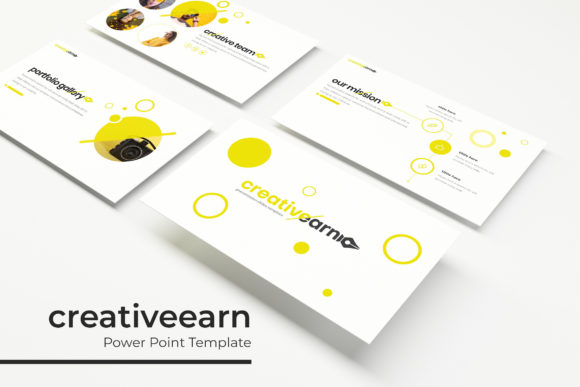
Creativeearn Power Point Template
The Creativeearn Power Point Template is a versatile and professional design solution tailored for creators, marketers, and business professionals who need to present ideas with clarity and style. With 150 slides in total, this template offers a comprehensive set of visual assets that can be adapted to a wide range of projects, from marketing presentations to creative portfolios.
One of the standout features of the Creativeearn Power Point Template is its use of five pre-made color schemes, each containing 30 slides. This allows users to quickly switch between different visual identities without having to start from scratch. Whether you're designing for a corporate event, a product launch, or a personal project, the ability to customize colors ensures your presentation aligns with your brand or message.
Key Features of the Creativeearn Power Point Template
The Creativeearn Power Point Template includes several key elements that make it an essential tool for any designer or presenter. These include:
- Handcrafted Infographic Section: A dedicated area for visual storytelling, making complex data easy to understand and engaging to view.
- Section Break Slides: These slides help organize content into clear segments, improving navigation and audience comprehension.
- Gallery and Portfolio Slides: Perfect for showcasing work, products, or services in a visually appealing format.
- Resizable and Editable Graphic Picture Placeholder: Users can easily insert and adjust images without compromising the layout.
- Drag-and-Drop Based on Master Slides: Simplifies the process of maintaining consistency across all slides.
The template also features pixel-perfect illustrations, ensuring that every visual element looks sharp and professional. This attention to detail makes the Creativeearn Power Point Template ideal for high-stakes presentations where quality matters.
Design Flexibility and Customization
With five color variations, the Creativeearn Power Point Template gives users the freedom to experiment with different aesthetics. Each color scheme is carefully curated to match modern design trends while maintaining a professional look. Whether you prefer bold and vibrant tones or muted and sophisticated palettes, there's a variation that suits your needs.
The template is also highly customizable, allowing users to modify layouts, add text, and incorporate their own branding elements. The inclusion of drag-and-drop functionality based on master slides ensures that even those with limited design experience can create polished presentations with ease.
For designers and marketers, the Creativeearn Power Point Template serves as a valuable asset when working on brand identity projects. Its clean and modern design supports both digital and print applications, making it suitable for social media graphics, web design, editorial layouts, and more.
Font Choices and Typography
The font used in the Creativeearn Power Point Template is a premium display font that adds a touch of elegance and sophistication. Designed with versatility in mind, this font works well in a variety of contexts, including logo design, packaging, and editorial projects. It’s particularly effective when paired with other complementary fonts to create a balanced and visually appealing composition.
When choosing a font for a presentation, readability is crucial. The font in the Creativeearn Power Point Template strikes a good balance between style and legibility, ensuring that your message is clear and easy to read. This is especially important when presenting to large audiences or in environments where visibility is limited.
For commercial use, the font included in the Creativeearn Power Point Template comes with a license that allows for a wide range of applications. This makes it a practical choice for businesses looking to maintain a consistent visual identity across multiple platforms.
Practical Tips for Using the Creativeearn Power Point Template
When using the Creativeearn Power Point Template, consider the following tips to get the most out of its features:
- Evaluate Project Fit: Determine whether the template aligns with the goals of your presentation. Consider the tone, audience, and purpose before making a final decision.
- Test Font Pairings: Experiment with different font combinations to find what works best for your content. The font in the Creativeearn Power Point Template pairs well with both serif and sans-serif typefaces.
- Review Included Styles: Take time to explore the various slide designs and layouts provided. This will help you identify which elements suit your project best.
- Consider Readability: Ensure that text is easy to read, especially in larger formats or when projected on a screen. Avoid overcrowding slides with too much information.
- Understand Commercial Licensing: Make sure you’re aware of the terms and conditions for using the font in commercial settings. This will help avoid any potential legal issues down the line.
By following these guidelines, you can maximize the effectiveness of the Creativeearn Power Point Template and create presentations that are both visually striking and functionally sound.
Real-World Applications and Examples
The Creativeearn Power Point Template is ideal for a wide range of real-world applications. For instance, a small business owner might use it to pitch a new product idea to investors, leveraging the clean design and professional layout to make a strong impression. Similarly, a marketer could use the template to present campaign results, using the infographic section to highlight key metrics in an engaging way.
Content creators and bloggers may find the gallery and portfolio slides useful for showcasing their work, while educators could benefit from the structured layout and section break slides to organize lesson plans effectively. The flexibility of the template makes it a valuable tool for anyone looking to communicate ideas clearly and professionally.
In summary, the Creativeearn Power Point Template is a powerful and adaptable resource for anyone involved in design, marketing, or content creation. Its combination of aesthetic appeal, functional features, and customization options makes it a top choice for professionals who want to elevate their presentations and leave a lasting impression.