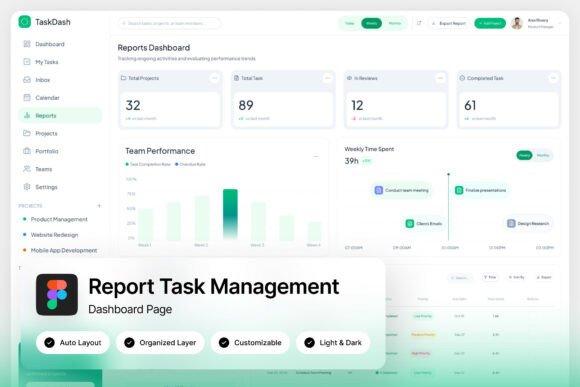
TaskDash Workspace Dashboard: A Modern Approach to Task Management and Reporting
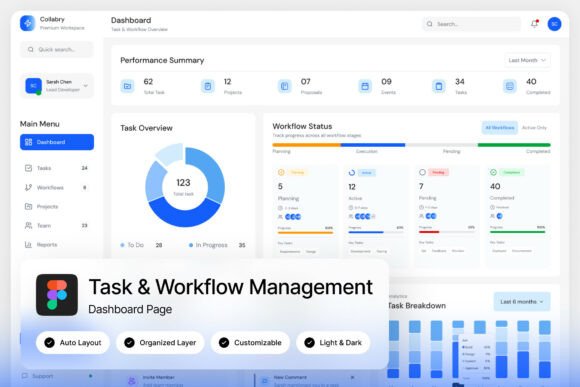
The TaskDash Workspace Dashboard is a clean, structured interface designed for task management and reporting. It offers a visually appealing layout that prioritizes clarity and productivity, making it an ideal choice for teams looking to streamline their workflow. With features such as project progress charts, team workload summaries, task completion trackers, and deadline panels, the dashboard provides a comprehensive overview of ongoing projects and team performance.
What Makes TaskDash Unique?
One of the standout aspects of TaskDash is its light and airy design, which contributes to a more focused and less cluttered work environment. The dashboard is built with a modern aesthetic in mind, featuring a unique, stylish layout that appeals to users who value both form and function. This design approach ensures that information is easy to digest without overwhelming the user with unnecessary visual elements.
Another key feature is the high-quality screen resolution of 1440×1024 px, which allows for a detailed and crisp display of all dashboard components. This resolution ensures that every element is clearly visible, whether you're working on a large monitor or a smaller device. The pixel-perfect layout further enhances the user experience by ensuring that each component aligns perfectly, contributing to a polished and professional look.
Customization and Flexibility
TaskDash offers a level of customization that makes it adaptable to a wide range of workflows and team structures. Users can easily edit the dashboard to suit their specific needs, allowing for a personalized experience that reflects their unique project management style. The well-organized layers within the design make it simple to locate and modify individual elements, streamlining the editing process.
The inclusion of free Google Fonts adds another layer of flexibility, enabling users to choose typography that aligns with their brand identity or personal preferences. This attention to detail ensures that the dashboard not only functions well but also looks great, reinforcing the importance of visual appeal in modern project management tools.
Light and Dark Mode Interface
A notable feature of TaskDash is its support for both light and dark mode interfaces. This dual-mode design caters to different user preferences and environmental conditions, ensuring that the dashboard remains comfortable to use in various lighting situations. Whether working in a brightly lit office or a dimly lit room, users can adjust the interface to suit their needs, enhancing overall usability and reducing eye strain.
This adaptability makes TaskDash a versatile tool that can be used across different settings and user scenarios. The ability to switch between modes also demonstrates the platform's commitment to user-centric design, where comfort and functionality go hand in hand.
Comparing TaskDash to Similar Tools
When evaluating project management tools, it's important to consider how they compare in terms of features, usability, and design. TaskDash stands out by offering a balanced combination of visual appeal and practical functionality. While some tools may prioritize advanced features over aesthetics, TaskDash manages to deliver both, making it a compelling option for teams that value a clean and efficient workspace.
Compared to other dashboards, TaskDash's focus on clarity and organization can be particularly beneficial for teams that need to track multiple projects simultaneously. Its structured layout allows users to quickly access the information they need without getting lost in a sea of data. This makes it a strong contender for teams that require a straightforward yet powerful task management solution.
Best Fit Scenarios for TaskDash
TaskDash is particularly well-suited for productivity app designers, project managers, and SaaS product teams who are looking for a reliable and customizable dashboard solution. Its modern design and flexible layout make it an excellent choice for teams that want to maintain a cohesive visual identity while managing complex workflows.
For example, a project manager overseeing multiple initiatives might find TaskDash's team workload summaries and deadline panels invaluable in keeping track of deadlines and resource allocation. The ability to customize the dashboard ensures that the manager can tailor the interface to reflect the specific needs of their team, enhancing efficiency and reducing the risk of missed deadlines.
Limitations and Tradeoffs
While TaskDash offers many advantages, it's important to recognize that no tool is perfect. One potential limitation is that its focus on simplicity and aesthetics may not appeal to users who require more advanced features or highly specialized tools. For teams with complex requirements, TaskDash may serve as a starting point, but additional tools or customizations might be necessary to fully meet their needs.
Additionally, the lack of integration with external platforms could be a drawback for some users. While TaskDash provides a robust internal dashboard, those who rely heavily on third-party tools may need to look for complementary solutions to ensure seamless workflow management.
When to Choose TaskDash
TaskDash is an excellent choice for teams that prioritize a clean, organized, and visually appealing workspace. If your team values clarity and efficiency, and you're looking for a dashboard that enhances productivity without sacrificing aesthetics, TaskDash is worth considering. Its intuitive design and customizable features make it a versatile tool that can grow with your team's needs.
However, if your team requires a highly specialized or feature-rich platform, it may be necessary to explore alternative options. In such cases, TaskDash can still serve as a foundational element, but additional tools may be needed to address more complex requirements.
Conclusion
The TaskDash Workspace Dashboard offers a modern, structured approach to task management and reporting. Its clean design, customizable features, and support for light and dark modes make it a valuable tool for teams looking to enhance their workflow. While it may not be the best fit for every scenario, its strengths in clarity, usability, and aesthetics position it as a strong contender in the project management space.
By understanding the unique features and limitations of TaskDash, users can make informed decisions about whether it aligns with their specific needs. Whether used as a standalone tool or integrated with other platforms, TaskDash provides a solid foundation for managing tasks and tracking progress effectively.